B21, China Town Mall, Midrand

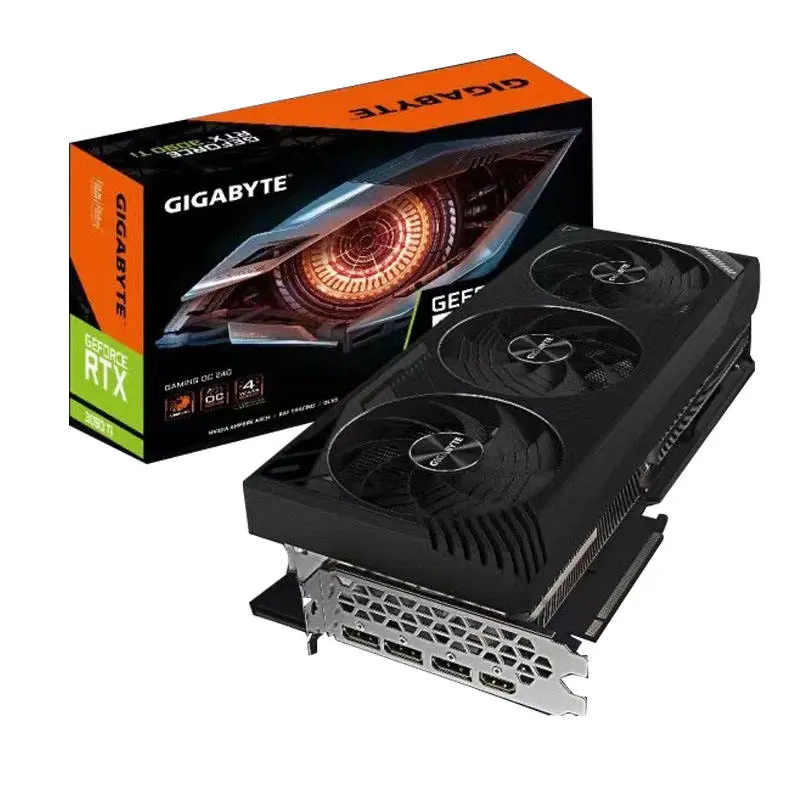
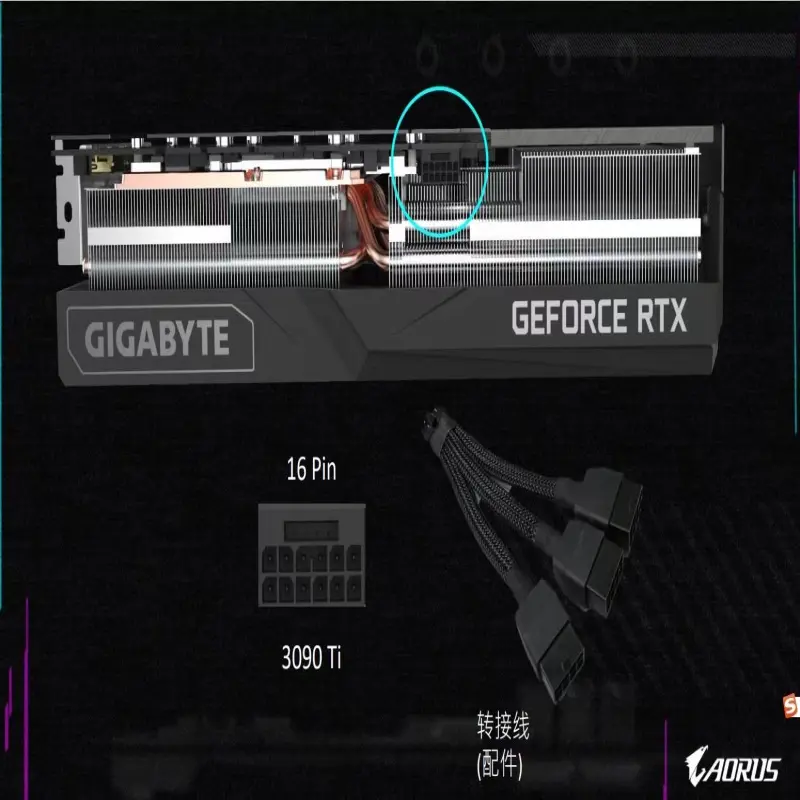
Gigabyte RTX 3090 Ti Gaming GPU with 24GB GDDR6X
Asset finance available
Do you want funding for this equipment?
Afrimart can connect you with trusted funding partners who specialise in asset finance for businesses like yours. Compare options and apply in minutes — final approval is subject to provider review.
Check funding options
Secure & no obligation

- Section : Computers
- Category : Graphic Cards
- SKU : 1600480355690

Products Description


| name | GeForce RTX3090 Ti | |||
| Core Clock: | 21000MHz | |||
| CUDA Cores: | 10752 | |||
| Memory Type | GDDR6X | |||
| Memory Size: | 24 GB | |||
| Memory Bus: | 384bit |
- Shipping Timeframes: All orders are processed within 2-5 business days (excluding weekends and holidays). After your order has been processed, the estimated delivery time is before 06 Sep, 2026, depending on customs, Please note that due to high demand, some items may experience longer shipping times, which will be communicated at order confirmation email.
- Order Processing Time: Please allow 2-5 business days for us to process your order before it is shipped . Orders placed after 16:00 on Fridays, or during weekends and public holidays, will begin processing on the next business day. Processing times may be extended during peak seasons or sales events.
- Manufacturing Time: Some products needs manufacturing time, the manufacturing process will take approximately 10-30 business days depending on the product. This timeframe may vary depending on the complexity of the product and current demand. but this will be communicated with you during order confirmation.
- Returns and Exchanges: We offer a 30-day return policy for most items. If you are not completely satisfied with your purchase, you may return it within 30 days of receipt for a refund or exchange. Items must be unused, in their original packaging, and accompanied by proof of purchase. Return shipping costs are the responsibility of the customer, unless the item was damaged or defective upon arrival.
1. What are the key specifications of the Gigabyte RTX 3090 Ti Gaming GPU?
This card features 10,752 CUDA cores, 24 GB of GDDR6X memory on a 384‑bit memory bus, and a listed core clock of 21000 MHz in the provided description (see next FAQ about this value).
2. The product description lists a core clock of 21000 MHz — is that correct?
No — 21000 MHz is almost certainly a typographical or formatting error in the description. Typical RTX 3090 Ti boost clocks are in the low thousands of MHz. For the exact boost/base clocks for this Gigabyte model, check the official Gigabyte product page or the retail specification sheet.
3. What kind of performance can I expect from this GPU?
With 10,752 CUDA cores and 24 GB of GDDR6X, the RTX 3090 Ti is designed for top-tier 4K gaming, real-time ray tracing, VR, and professional content creation workflows (3D rendering, video editing, AI experimentation). Actual frame rates depend on the game, settings, CPU, and system configuration.
4. What interface does the card use and what slot do I need on my motherboard?
The card uses a PCI Express x16 interface and requires a free PCIe x16 slot on your motherboard. It is backward and forward compatible with PCIe 3.0/4.0 slots, though optimal bandwidth comes from PCIe 4.0 (if supported).
5. How much system power (PSU) do I need to run this GPU?
High‑end RTX 3090 Ti cards are power‑hungry. Gigabyte models typically recommend an 850W (or higher) quality PSU for a single‑GPU system, depending on your CPU and other components. Verify the manufacturer recommendation for the specific model before purchase.
6. Which power connectors does the card require?
Connector requirements vary by Gigabyte model and revision. Many RTX 3090 Ti cards require multiple 8‑pin PCIe power connectors or the newer 12VHPWR (ATX 3.0) connector. Check the exact product specification or the card's I/O area to confirm which connectors and adapters you will need.
7. What video outputs does the Gigabyte RTX 3090 Ti include?
Output configurations vary by board design. Common outputs on RTX 3090 Ti cards include HDMI 2.1 and multiple DisplayPort 1.4a ports. Refer to the product page or images for the exact port layout of the Gigabyte Gaming model you're buying.
8. Does this GPU support ray tracing and DLSS?
Yes. As an NVIDIA Ampere‑class GPU, the RTX 3090 Ti supports real‑time ray tracing and NVIDIA DLSS (Deep Learning Super Sampling). DLSS performance and quality will depend on driver support and game implementation.
9. Is the card suitable for professional workloads like 3D rendering or AI development?
Yes. The 24 GB of GDDR6X memory and large CUDA core count make the card well suited for memory‑intensive workloads such as 3D rendering, large scene handling, GPU‑accelerated video editing, and some AI/ML experimentation. For mission‑critical professional use, also consider workstation‑oriented GPUs and vendor support options.
10. What cooling solution does the Gigabyte Gaming model use and how large is the card?
Cooling and card dimensions vary by Gigabyte model (triple‑fan designs and large heatsinks are common). These cards are often 2.5–3 slot designs. Always check the exact dimensions and clearance requirements on the product page to ensure it fits your case.
11. Can I overclock the Gigabyte RTX 3090 Ti and is there software for that?
Yes, Gigabyte typically provides overclocking tools such as AORUS Engine or Gigabyte OC software to adjust clock speeds, fan curves, and voltages. Overclocking results vary by silicon and cooling; proceed with caution and monitor temperatures.
12. Which operating systems and drivers are supported?
The GPU is supported by NVIDIA drivers for Windows (Windows 10/11) and Linux. Always download the latest drivers from NVIDIA's website or use Gigabyte/NVIDIA tools to ensure full feature support and stability.
13. Does this card support multi‑GPU configurations (SLI/NVLink)?
Multi‑GPU support for gaming (SLI) has been largely deprecated in modern drivers and titles. Physical NVLink bridges were supported on some RTX 3090 variants in the past, but support and usefulness vary by application. Check Gigabyte's specification and NVIDIA documentation if you require multi‑GPU capabilities for specific professional software.
14. What warranty and customer support options are available?
Warranty coverage and duration depend on the region and the retailer or Gigabyte's local policies. Check the Gigabyte warranty information included with your purchase or the retailer listing for specific terms, RMA procedures, and what is covered.
Latest Order Arrivals
Discover our latest orders

12 Heads Embroidery Machine

Toilet Paper Machine Machine

Order Collection

Cross Border Clients

Order cros border countries Collected

Industrial Machine Cllection

Agriculture Processing Machines

Ready for collection

Water Pump Equipment

Packaging Machine and accessories

Fabrics Manufacturing Equipment

Mining Equipments

Food Processing Machine

Batch of Orders

Batch of Orders

Latest Orders Labelled

wheel alignment machines

new arrivals

Pre Orders Offloading

Latest Arrivals

Latest Arrivals

Latest Arrivals

Loading

Toilet paper making machine

Toilet paper making machine

Toilet paper Rewinding Machine

latest arrivals

offloading

order success

order collection

order offloading