B21, China Town Mall, Midrand

Browse categoriesView all categories
Appliances
View all products →Beauty & Personal Care
View all products →Car Parts
View all products →Computers
View all products →Construction Material
View all products → Building Boards & Insulation
 Coated & Treated Products
Decorative Building Materials
EPDM/PVC/TPO Membrane
Coated & Treated Products
Decorative Building Materials
EPDM/PVC/TPO Membrane
 Flat Products (Sheets, Plates & Coils)
Gabion mesh
Geocell
Geogrid
Geomembrane Welding machine
HDPE Geomembrane
HDPE Geomembrane
Hdpe/Pvc Pipe
Industrial Hardware & Fasteners
LDPE LLDPE Geomembrane
Luxury Wall Panels
Nonwoven Geotextile
Other Geosynthetics
Pipe Floater
Pipeline & Fluid Systems
Pipes & Hollow Sections
PVC Ceilings
PVC Cornices
PVC Suspended Ceilings
PVC Wall Panels
Roofing & Cladding
Roofing & Corrugated Sheets
Rubber Hose
SPC Flooring
Strips & Bars
Structural Steel & Profiles
Flat Products (Sheets, Plates & Coils)
Gabion mesh
Geocell
Geogrid
Geomembrane Welding machine
HDPE Geomembrane
HDPE Geomembrane
Hdpe/Pvc Pipe
Industrial Hardware & Fasteners
LDPE LLDPE Geomembrane
Luxury Wall Panels
Nonwoven Geotextile
Other Geosynthetics
Pipe Floater
Pipeline & Fluid Systems
Pipes & Hollow Sections
PVC Ceilings
PVC Cornices
PVC Suspended Ceilings
PVC Wall Panels
Roofing & Cladding
Roofing & Corrugated Sheets
Rubber Hose
SPC Flooring
Strips & Bars
Structural Steel & Profiles
Consumer Electronics
View all products → Camera & Photo
 Chargers, Batteries & Power Supplies
 Commercial Equipment
 Home Audio & Video
 Portable Audio
 Printing Equipment
 Professional Audio
 Security & Protection
 Testing Equipment
Commercial Equipment
 Advertising Boards
 Advertising Inflatables
 Advertising Light Boxes
 Commercial Fryers
 Computer Hardware & Software
 Digital Signage and Displays
 Display Racks
 Food Trucks
 Ice Cream Machines
 Interactive Boards
 Photo Booths
 Projectors & Presentation Equipments
 Refrigeration Equipment
 Supermarket Shelves
 Vending Machines
Electrical & Tools
View all products →Furniture
View all products → Bedroom Furniture
 Commercial Furniture
 Decorations
 Dining Room Furniture
 Kitchen Furniture
 Living Room Furniture
 Office Furniture
Kids & Toys
View all products →Machinery
View all products →
Aftersales
 Agriculture Machinery
 Apparel Machinery
 Chemical Machinery
 Cleaning Equipment
 Construction Machinery
 Environmental Machinery
 Food & Beverage Machinery
 Industrial Machinery
 Machine Tool Equipment
 Machinery Accessories
 Material Handling
 Packaging Machines
Agriculture Machinery
Apparel Machinery
Chemical Machinery
Cleaning Equipment
Construction Machinery
Environmental Machinery
Food & Beverage Machinery
Industrial Machinery
Machine Tool Equipment
Machinery Accessories
Material Handling
Packaging Machines
Construction Machinery
 Brick Making Machinery
 Concrete Mixers
 Concrete Pumps
 Crushers
 Drilling Rigs
 Engineering & Construction Machinery
 Excavators
 Gas Generation Equipment
 Loaders
 Mineral Separators
 Mining Machinery
 Mortar Spray Machines
 Other Construction Machinery
 Road Machinery
 Stone Machinery
 Tile Making Machinery
 Truck Cranes
Food & Beverage Machinery
 Baking Equipments
 Beverage & Wine Machines
 Cake machine
 Donut machines
 Fermenting Equipment
 Fish Processing Machines
 Flour & Rice Mills
 Flour Mill
 Food Sterilizers
 Fruit & Vegetable Processing Machines
 Fruit & Vegetable Processing Machines
 Fryers
 Ice Cream Machines
 Juice Extractors
 Meat Processing Machinery
 Meat Slicers
 Other Food Processing Machinery
 Popcorn machine
 Snack Machines
 Vegetable Cutters
 Vegetable Washing Equipments
Industrial Machinery
 Apparel & Textile Machinery
 CNC industrial Machinery
 Industrial Compressors & Parts
 Industrial Robots
 Industry Laser Equipment
 Machine Tool Equipment
 Manufacturing Machinery
 Metal & Metallurgy Machinery
 Paper Production Machinery
 Plastic & Rubber Processing Machinery
 Welding Equipment
 Woodworking Machinery
Medical Supplies
View all products → Animal & Veterinary
 Household Medical Devices
 Medical Consumables
 Professional Medical Devices
 Testing Instrument
Professional Medical Devices
 Bone Surgical Instruments
 Burns Surgery Instruments
 Clinical Analytical Instruments
 Clinics Apparatuses
 Dental Chair
 Dental Consumables
 Dental Equipments
 Dental Handpiece
 Diagnostic Apparatuses
 Emergency & Clinics Apparatuses
 General Assay & Diagnostic Apparatuses
 Hospital Beds
 Hospital Chairs
 Hospital Trolley
 Implants & Interventional Materials
 Medical Cryogenic Equipments
 Medical Imaging Equipment
 Medical Optical Instruments
 Medical Ultrasound Instruments
 Medical X-ray Equipments
 Obstetrics & Gynecology Equipments
 Oral Therapy Equipments
 Physical Therapy Equipment
 Radiology Equipment & Accessories
 Rehabilitation Equipment
 Stethoscope
 Surgical Instruments
 Transfusion, Dialysis & Circulation Machines
 Vacuum Suction Devices
 Visual Acuity Examination Supplies
Pet Supplies
View all products →Phones & Accessories
View all products → Featured Accessories
 Mobile Phones
 Phone Accessories
 Screen Protector Machines
 Tablets
 Telecommunications
Telecommunications
 Broadcast Intercom Systems
 Camera Modules
 Communication Antennas
 Corded Telephones
 Development Boards, Kits
 Enterprise Firewalls
 Enterprise Switches
 Fiber Optic Equipment
 Fixed Wireless Terminals
 Other Telecommunications Products
 PBX
PBX
 Signal conversion Boards
 Telecom Parts
 Wireless Infrastructure Equipment
Production Lines
View all products →Metal Components
Custom fabricated metal assemblies
Flanges, couplings, and joints
Machined metal parts and forgings
Metal brackets, connectors, and fasteners
Metal frames and chassis components
Metal plates, sheets, and coils
Metal stampings and pressings
Pipes, tubes, and fittings (steel, copper, aluminum)
Steel beams, angles, channels, and structural sections
Wire mesh and expanded metal
Raw Inputs
Ceramic powders and compounds
Composite material components
Glass sheets and raw glass materials
Plastic resins and polymers (pellets, granules, powder)
Raw minerals and aggregates
Raw rubber and elastomer compounds
Raw steel, aluminum, copper, and other metal stock materials
Textile fibers and fabrics
Wood lumber and timber sheets
Renewable Energy
View all products → Batteries & Energy Storage
 Flexible Solar Panels
 Home Energy Storage
 Hydro, Hydrogen & Bioenergy
 Inverters, Controllers & UPS
 Lead Acid Batteries
 Lithium Ion Batteries
 Renewable Energy Accessories
 Renewable Energy Components & Equipment
 Solar Charge Controller
 Solar Inverters
 Solar Light
 Solar Lighting & Water Pumps
 Solar Panels
 Solar Panels & Systems
 Solar Production Lines
 Wind Power Generation System
 Wind Turbines & Systems
Sports & Entertainment
View all products →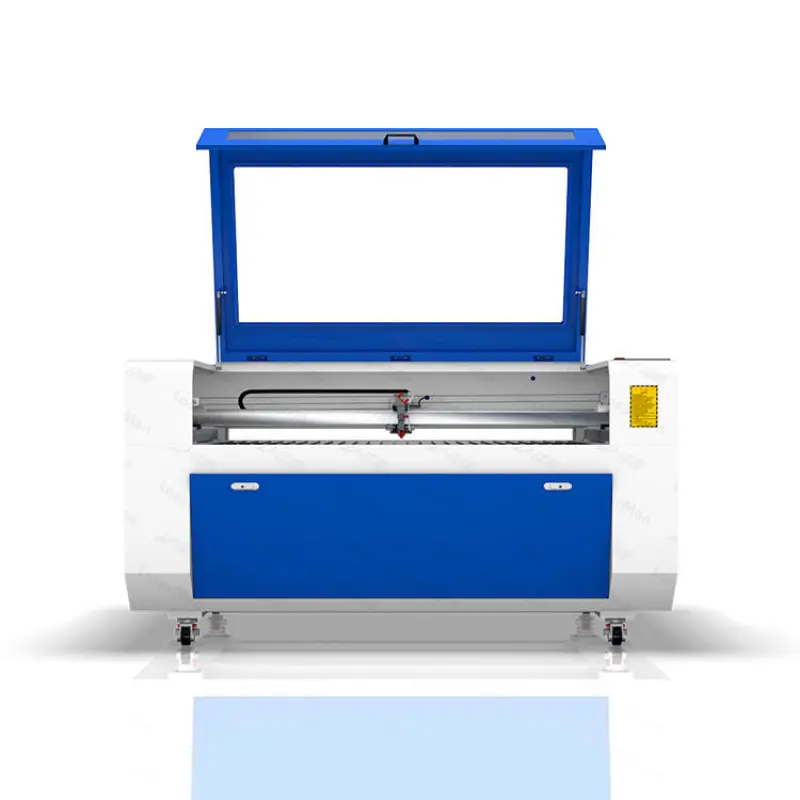
CNC industrial Machinery
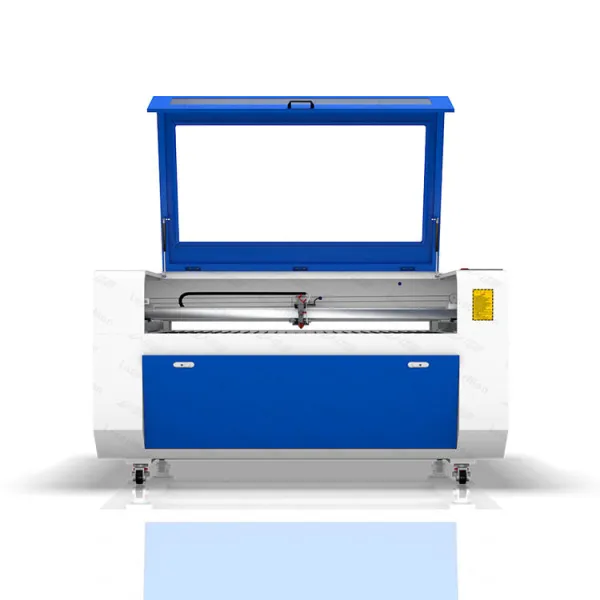
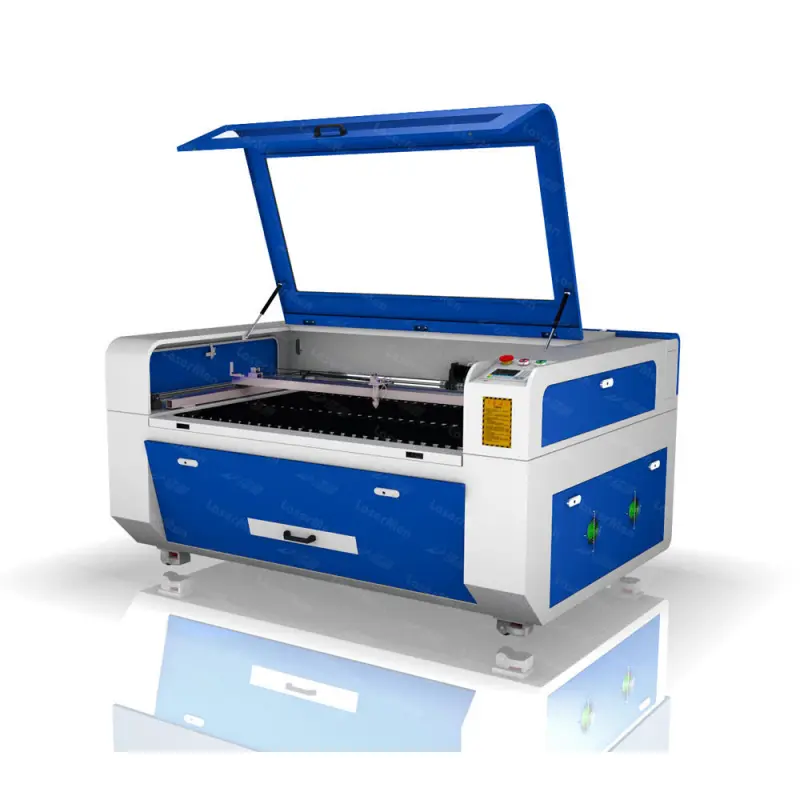
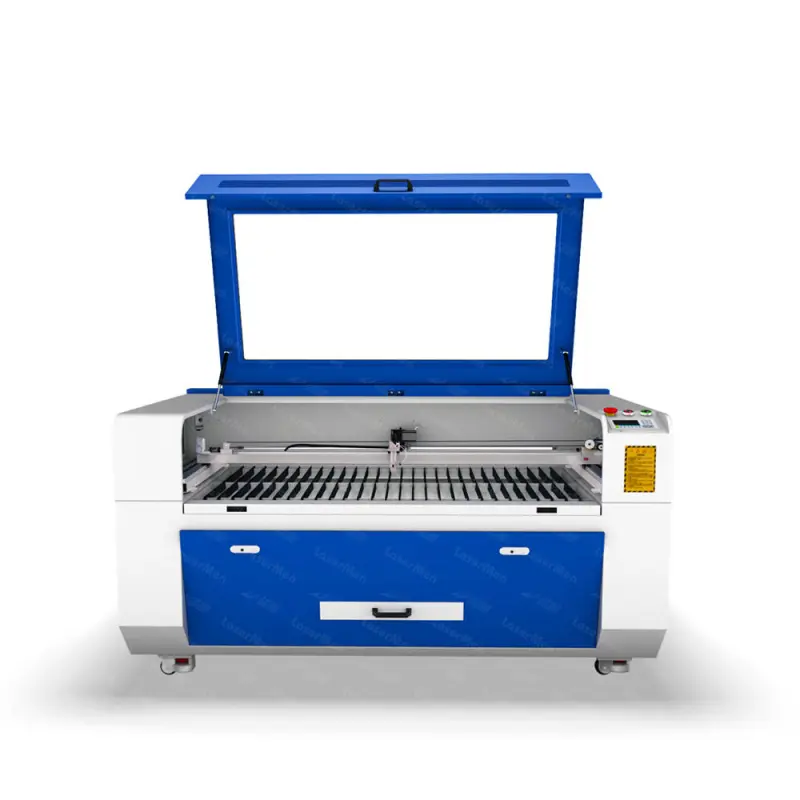
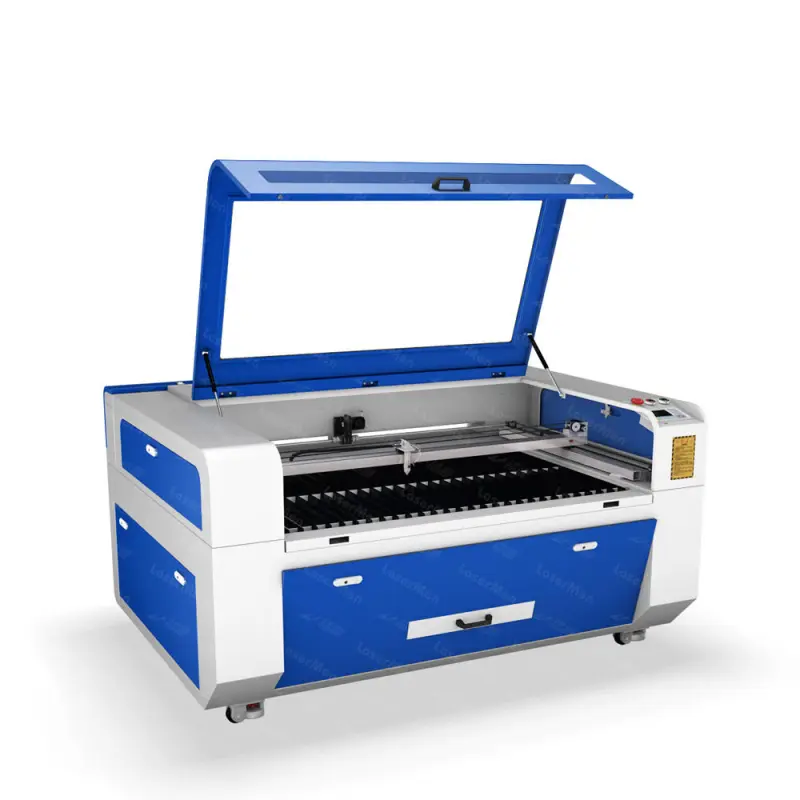
co2 Laser Engraving Cutting Machine Leather Shoes Cut cnc Laser Cutter Machine For Small Craft Making
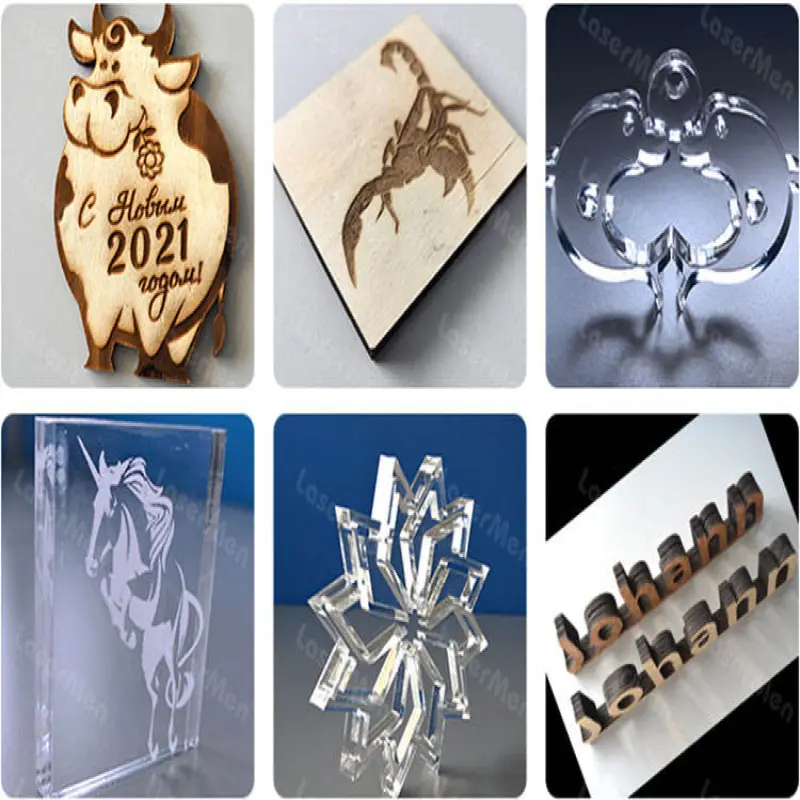
The CO2 Laser Engraving Cutting Machine is designed for versatility and precision, perfect for crafting leather shoes and other small projects. This multifunctional machine efficiently handles a variety of nonmetallic materials, making it an essential tool for hobbyists...
Select a product option to continue.
Asset Finance Available
Check Funding Options
Explore funding with Afrimart's partners. Subject to provider approval.

Product Description
CO2 Laser Engraving Cutting Machine for Leather and Crafts
The CO2 Laser Engraving Cutting Machine is designed for versatility and precision, perfect for crafting leather shoes and other small projects. This multifunctional machine efficiently handles a variety of nonmetallic materials, making it an essential tool for hobbyists and small businesses alike.
Key Features
Multiple Sizes Available: Choose from five sizes to suit your needs: 60x40 cm, 90x60 cm, 130x90 cm, 140x90 cm, and 160x100 cm.
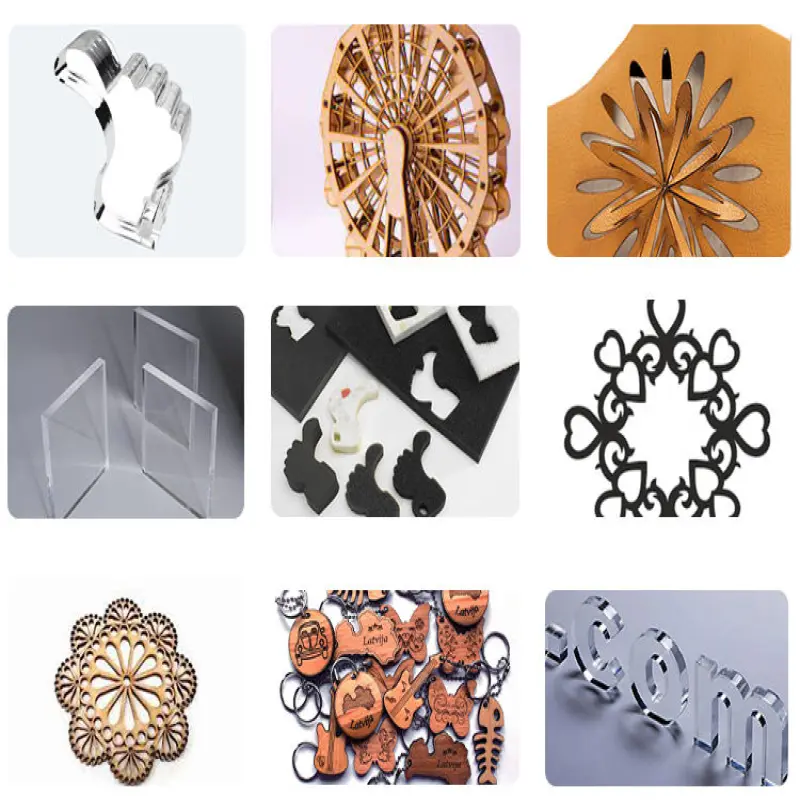
Variable Laser Power: Equipped with CO2 laser tubes ranging from 80W to 300W, this machine can engrave and cut a wide array of materials, including acrylic, wood, MDF, rubber, PVC, leather, paper, stone, and glass.
High-Speed Performance: Achieve fast engraving speeds of up to 1200 mm/sec, allowing for quick project completion.
Comprehensive Setup: The machine includes essential components such as the laser tube, water cooling system, air blowing pump, and exhaust fan, ensuring smooth operation.
Optional Features: Enhance your experience with optional functions like a red dot pointer, motorized up-down table, rotary attachment, auto focus, and WIFI connectivity for added convenience.
Improved Accuracy: The reduction wheel design enhances cutting accuracy for detailed work.
Extended Material Handling: The front-to-back material passage feature accommodates longer materials, solving size limitations during operation.
In summary, the CO2 Laser Engraving Cutting Machine is a reliable and efficient choice for crafting leather shoes and other small items, offering precision and flexibility in your creative projects.
Technical Specifications:
| Model | CO2 Laser Cutting Machine (Shoe Design Series) |
|---|---|
| Laser Type | CO2 Glass Tube Laser |
| Laser Power | 60W / 80W / 100W / 130W (Customizable) |
| Working Area | 600mm x 400mm (Standard) / Custom Sizes Available |
| Cutting Thickness | ≤10mm (Leather/Fabric) / ≤8mm (Rubber/PU) |
| Engraving Speed | 0-1000mm/s (Adjustable) |
| Cutting Speed | 0-500mm/s (Adjustable) |
| Precision | ±0.01mm |
| Software | Compatible with CorelDraw, AutoCAD, LightBurn |
| Cooling System | Water Cooling (Included) |
| Voltage | 110V-220V (Auto-Adapting) |
| Machine Weight | Approx. 120kg |
| Dimensions (LxWxH) | 1400mm x 1000mm x 1050mm |
Why Choose This Machine?
✅ Perfect for Shoe Manufacturers – Create custom perforations, logos, and patterns effortlessly.
✅ Faster Than Manual Cutting – Increase production speed & reduce labor costs.
✅ Multi-Material Compatibility – Works on leather, fabric, rubber, foam, acrylic, and wood.
✅ Great for Small Businesses & Large Factories – Scalable for workshops or industrial use.
Ideal For:
Shoe & Sneaker Manufacturers
Leather Goods & Handbag Designers
Textile & Fashion Industries
Upholstery & Automotive Interior Customization
DIY Crafters & Small Business Owners
Product Info Gallery


Product Details


Frequently Asked Questions
What materials can this CO2 laser cutter work with?
The machine is optimized for non-metallic materials including leather, fabric, rubber, foam, acrylic, wood, MDF, paper, stone (surface engraving), and glass (surface engraving). Avoid cutting materials that contain chlorine (e.g., PVC/vinyl) or highly reflective metals—these can produce toxic gases or damage the laser tube.
What sizes and laser power options are available?
Multiple working areas are offered: 600×400 mm (standard), 900×600 mm, 1300×900 mm, 1400×900 mm, and 1600×1000 mm. Laser power is customizable—common options include 60W, 80W, 100W, 130W up to higher CO2 glass tube options (up to ~300W) depending on the model and your needs. Contact the seller for exact model/power combinations.
What thickness of material can it cut and engrave?
Typical cutting thickness is up to 10 mm for leather and fabrics and up to 8 mm for rubber/PU, depending on laser power and number of passes. Engraving depth depends on material and settings; perform tests to determine optimal parameters.
What speeds and precision can I expect?
Engraving speed is adjustable (commonly 0–1000 mm/s, up to 1200 mm/s on some configurations) and cutting speeds typically range up to 500 mm/s. Positional precision is approximately ±0.01 mm, depending on model and maintenance.
Which software and file formats are supported?
The machine is compatible with popular design packages such as CorelDRAW, AutoCAD and LightBurn. Supported file formats typically include DXF, SVG, AI, PLT as well as common raster formats (BMP, JPG, PNG). Confirm exact supported formats with your supplier or software version.
What accessories and systems are included with the machine?
Standard inclusions are the CO2 laser tube, water cooling system, air-assist pump (air blowing), and exhaust fan. The standard package may also include a control system and basic tooling; optional extras (see below) are not always included.
What optional features are available?
Optional upgrades may include a red dot pointer for easy positioning, motorized up-down worktable, rotary attachment for cylindrical items, auto-focus module, and WIFI connectivity for wireless file transfer. Availability depends on the chosen model and vendor.
How is the machine cooled and how do I handle fumes?
The unit uses a water cooling system for the CO2 tube (included). An exhaust fan is provided to remove smoke and fumes; it’s essential to use proper ventilation and, for many materials, an external fume extractor or ducting to the outside. Air-assist reduces charring and improves cut quality.
Is the machine safe to operate in a small workshop?
When used with proper safety measures it is suitable for small workshops: always operate with the enclosure and interlocks in place, use appropriate ventilation/fume extraction, never look directly at the laser beam, and follow local fire-safety rules. Ask your supplier for recommended PPE and safety training.
Can this machine be used specifically for making leather shoes?
Yes — it’s well suited for shoe components: cutting patterns, perforations, logos, and surface engraving on leather and synthetic materials. For full shoe manufacturing workflows, combine the cutter with pattern fixtures and test settings for each material to optimize quality and yield.
How do I maintain the machine and what is the expected lifetime of consumables?
Regular maintenance includes cleaning lenses and mirrors, checking alignment, replacing water and keeping it clean, inspecting belts and rails, and cleaning the workbed and exhaust. Laser tube life varies by type, power and usage—ask the seller for expected working hours and spare part options. Keep a maintenance log and follow the supplier’s maintenance schedule.
What connectivity options are available for sending files?
Standard connection methods typically include USB cable/USB disk and a PC connection through control software. WIFI or network connectivity may be available as an optional upgrade; confirm with the seller.
Do you provide installation, training and after-sales support?
Many suppliers provide setup guides, remote commissioning support, and optional on-site installation and training packages. Warranty, spare parts availability, and response times for service vary—confirm service terms with your vendor before purchase.
Are there any materials I should not cut or engrave with a CO2 laser?
Do not cut PVC/vinyl, ABS, or other chlorine-containing plastics (these release corrosive and toxic gases). Avoid highly reflective metals with a CO2 laser as they reflect IR and can damage optics. When in doubt, test a small sample and ensure adequate exhaust and filtration.
Technical Specifications
No approved technical specifications are available yet. Please refer to the product description or contact our team.
Related Products
Latest Order Arrivals
Discover our latest orders

12 Heads Embroidery Machine

Toilet Paper Machine Machine

Order Collection

Cross Border Clients

Order cros border countries Collected

Industrial Machine Cllection

Agriculture Processing Machines

Ready for collection

Water Pump Equipment

Packaging Machine and accessories

Fabrics Manufacturing Equipment

Mining Equipments

Food Processing Machine

Batch of Orders

Batch of Orders

Latest Orders Labelled

wheel alignment machines

new arrivals

Pre Orders Offloading

Latest Arrivals

Latest Arrivals

Latest Arrivals

Loading

Toilet paper making machine

Toilet paper making machine

Toilet paper Rewinding Machine

latest arrivals

offloading

order success

order collection

order offloading