B21, China Town Mall, Midrand

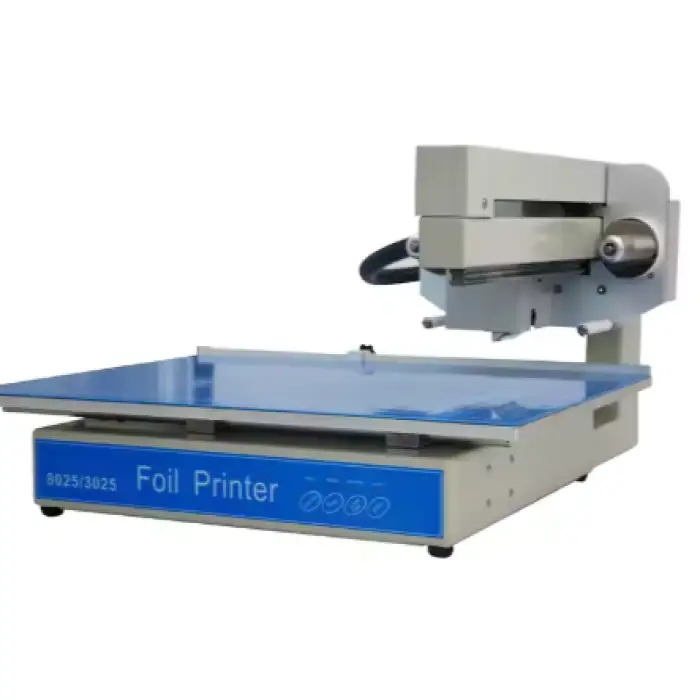
WD-3025 Automatic Gold Foil Printing Machine Digital Hot Foil Stamping Machine
Asset finance available
Do you want funding for this equipment?
Afrimart can connect you with trusted funding partners who specialise in asset finance for businesses like yours. Compare options and apply in minutes — final approval is subject to provider review.
Check funding options
Secure & no obligation

- Section : Consumer Electronics
- Category : Printing Equipment
- SKU : 1601456394178

WD-3025 Automatic Gold Foil Printing Machine Digital Hot Foil Stamping Machine
The WD-3025 Automatic Gold Foil Printing Machine is the perfect solution for high-quality foil stamping. This advanced machine is designed to make printing easy and efficient. With its automatic features, you can create stunning designs on various materials, making it an essential tool for businesses and creatives alike.
Specifications
| Attribute | Details |
|---|---|
| Max Printing Length | 250*300mm |
| Max Thickness Admits | 30mm |
| Speed | 20-50mm/s |
| Max Feeding Width | 450mm |
| Print Head Life | 150000m |
| Resolution | 300dpi |
| Power Source Specification | AC 110-240V 50/60HZ |
| Power | 150W |
| Compatible Software | Coreldraw, AI, Photoshop, PDF |
| Warranty | 1 Year |
Key Features
- Automatic operation for ease of use
- Single color flatbed printing
- Compatible with various media types
- High printing speed for efficiency
- Digital display screen for easy monitoring
- Works well with Windows operating systems
Applications
- Card printing for business and events
- Paper printing for customized materials
- Tube printing for packaging solutions
- Phone case printing for personalized products
- Creative projects that require foil stamping
With the WD-3025 Automatic Gold Foil Printing Machine, you can elevate your printing projects to the next level. Enjoy the benefits of fast, high-quality printing for all your creative needs!
Product Info Gallery
- Shipping Timeframes: All orders are processed within 2-5 business days (excluding weekends and holidays). After your order has been processed, the estimated delivery time is before 03 Aug, 2026, depending on customs, Please note that due to high demand, some items may experience longer shipping times, which will be communicated at order confirmation email.
- Order Processing Time: Please allow 2-5 business days for us to process your order before it is shipped . Orders placed after 16:00 on Fridays, or during weekends and public holidays, will begin processing on the next business day. Processing times may be extended during peak seasons or sales events.
- Manufacturing Time: Some products needs manufacturing time, the manufacturing process will take approximately 10-30 business days depending on the product. This timeframe may vary depending on the complexity of the product and current demand. but this will be communicated with you during order confirmation.
- Returns and Exchanges: We offer a 30-day return policy for most items. If you are not completely satisfied with your purchase, you may return it within 30 days of receipt for a refund or exchange. Items must be unused, in their original packaging, and accompanied by proof of purchase. Return shipping costs are the responsibility of the customer, unless the item was damaged or defective upon arrival.
1. What is the maximum printable area of the WD-3025?
The maximum printable area is 250 x 300 mm (length x width), suitable for most cards, panels, and small flat objects.
2. What is the maximum material thickness the machine can handle?
The WD-3025 accepts materials up to 30 mm thick.
3. What printing speed can I expect?
Printing speed ranges from 20 to 50 mm/s; you can adjust speed depending on material and desired quality.
4. What materials can be foil stamped with this machine?
It supports a wide range of flat media including paper, cardstock, coated paper, cardboard, some plastics (e.g., phone cases), and many synthetic/leather-like materials. Always test new substrates first to confirm adhesion and heat tolerance.
5. Is the WD-3025 single-color or multi-color?
This is a single-color flatbed hot foil stamping machine. Multi-color effects can be achieved by running multiple passes with careful registration.
6. What types of foil can I use (gold only)?
While marketed for gold foil, the machine is compatible with typical hot stamping foils such as gold, silver, colored metallics, matte foils, and holographic foils—provided the foil width and core fit your setup.
7. Which software and file formats are supported?
The WD-3025 is compatible with CorelDraw, Adobe Illustrator (AI), Photoshop, and PDF files. Prepare artwork at 300 dpi for best results; vector files are recommended for crisp edges.
8. Which operating systems does the machine work with?
The machine is designed to work with Windows operating systems. If you use macOS, export to PDF or use a Windows virtual machine or PC for direct control.
9. What are the power requirements?
Power specification is AC 110–240 V, 50/60 Hz with a rated power consumption of 150 W.
10. How long does the print head last?
The print head life is rated to 150,000 m (meter) of printing. Actual lifespan will vary with usage, maintenance, and material type.
11. What warranty and after-sales support are provided?
The WD-3025 comes with a 1-year warranty. For setup, spare parts, or technical support beyond the warranty, contact your supplier or authorized service provider.
12. How do I maintain and clean the machine?
Regular maintenance includes keeping the flatbed and heating area free of foil residue and dust, checking rollers and feed paths for debris, and following the manufacturer’s maintenance schedule. Replace foil rolls and worn parts as needed and power off and allow cooling before cleaning.
13. My prints are coming out too light or uneven. What should I check?
Check foil tension and alignment, increase stamping pressure or temperature (if adjustable), slow down the speed, ensure the substrate is flat and properly positioned, and confirm artwork density and DPI. Run test settings on scrap material until you achieve the desired result.
14. How is artwork transferred to the machine—do I need a special driver or can I use USB/PC?
The WD-3025 works with common design software on Windows. Typically you prepare artwork in CorelDraw/AI/Photoshop or export as PDF and send it to the machine via the provided connection method/driver. Consult your supplier for the exact connection method and driver installation instructions.
15. Are there any safety precautions I should follow?
Yes. Operate on a stable, grounded outlet (AC 110–240 V), avoid touching heated elements during or immediately after operation, allow cooling before maintenance, keep hands and loose clothing away from moving parts, and follow all local electrical and workplace safety guidelines.
Latest Order Arrivals
Discover our latest orders

12 Heads Embroidery Machine

Toilet Paper Machine Machine

Order Collection

Cross Border Clients

Order cros border countries Collected

Industrial Machine Cllection

Agriculture Processing Machines

Ready for collection

Water Pump Equipment

Packaging Machine and accessories

Fabrics Manufacturing Equipment

Mining Equipments

Food Processing Machine

Batch of Orders

Batch of Orders

Latest Orders Labelled

wheel alignment machines

new arrivals

Pre Orders Offloading

Latest Arrivals

Latest Arrivals

Latest Arrivals

Loading

Toilet paper making machine

Toilet paper making machine

Toilet paper Rewinding Machine

latest arrivals

offloading

order success

order collection

order offloading