B21, China Town Mall, Midrand


Automatic Bag and Card Separator

- Section : Machinery
- Category : Manufacturing Machinery
- SKU : 1600895416771

Automatic Bag and Card Separator
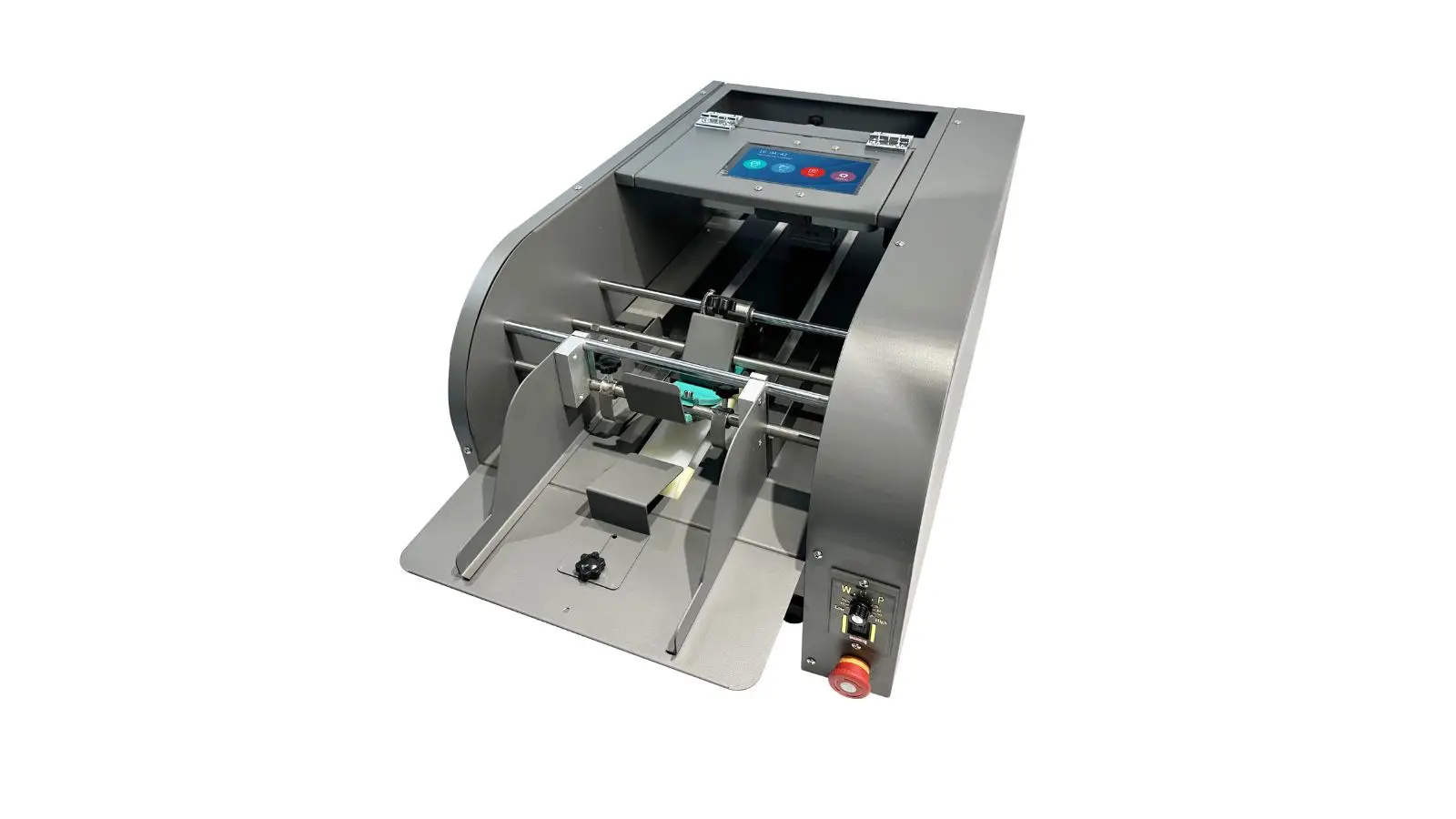
The Automatic Bag and Card Separator is designed to streamline the printing process by automatically separating stacked bags or cards and feeding them to a conveyor belt one at a time. This machine enhances operational efficiency, making it easier for inkjet printers to mark production dates, batch numbers, anti-counterfeiting features, and patterns.
Key Features
Automatic Separation: Effectively separates stacked items, allowing for single-page delivery to the conveyor belt.
High-Speed Performance: Features stepless speed regulation for high-speed automatic paging, ensuring fast operation.
Precision Positioning: Delivers high precision in positioning, enhancing the quality of printing.
User-Friendly Design: Built with a qualified structural design for easy and quick replacement of wearing parts.
Automatic Receiving Device: Includes an automatic receiving device to simplify production operations.
In summary, the Automatic Bag and Card Separator improves the efficiency of printing operations by reducing manual intervention and taking full advantage of high-speed inkjet printers. Its innovative design and precision make it a valuable asset in any production environment.
Product Info Gallery
| T-W Series Paging and Coding Machine | |
| Printer Size | 210 * 110 * 40 mm |
| Material | Metal body |
| Weight | About 800g(the ink cartridge not included) |
| Screen Size | 7inch touch screen |
| Store Information | Unlimited Storage |
| Resolution | 150/300/600DPI |
| Count | 1-15 digital |
| Code | Bar code qr code, variable qr code |
| The External Interface | The power interface,RS232 interface, USB interface, hdmi |
| Environment | Temperature 0-40℃、humidity 10-80% |
| Oily Ink Color | Black、Red、Blue、Green、Yellow、invisible |
| Fast Dry Ink Color | Black、red、blue、green、yellow、orange、white、invisible |
| Ink Volume | 42CC(half inch)、45CC(one inch) |
| Ink Cartridge | Fast dry ink、water ink |
| Spray Print Fonts | Synchronize with machines and computers |
| Printing Distance | 2-3mm |
| Printing Height | 2-12.7mm、2-25mm、2-50mm、2-150mm |
| Printing Speed | 5-100m/min |
| Printing Content | date、count、batch Number、code、photo etc |
| Power Specification | 16V3A\5A adapter |
T-W Series Paging and Coding Machine
- Shipping Timeframes: All orders are processed within 2-5 business days (excluding weekends and holidays). After your order has been processed, the estimated delivery time is before 03 Aug, 2026, depending on customs, Please note that due to high demand, some items may experience longer shipping times, which will be communicated at order confirmation email.
- Order Processing Time: Please allow 2-5 business days for us to process your order before it is shipped . Orders placed after 16:00 on Fridays, or during weekends and public holidays, will begin processing on the next business day. Processing times may be extended during peak seasons or sales events.
- Manufacturing Time: Some products needs manufacturing time, the manufacturing process will take approximately 10-30 business days depending on the product. This timeframe may vary depending on the complexity of the product and current demand. but this will be communicated with you during order confirmation.
- Returns and Exchanges: We offer a 30-day return policy for most items. If you are not completely satisfied with your purchase, you may return it within 30 days of receipt for a refund or exchange. Items must be unused, in their original packaging, and accompanied by proof of purchase. Return shipping costs are the responsibility of the customer, unless the item was damaged or defective upon arrival.
1. What is the Automatic Bag and Card Separator and what does it do?
The Automatic Bag and Card Separator automatically separates stacked bags or cards and feeds them one at a time onto a conveyor belt. It streamlines printing workflows by reducing manual handling and enabling consistent feeding for inkjet coders (dates, batch numbers, codes, patterns, etc.).
2. What types of items can the machine separate?
It is designed for flat, stackable items commonly used in production and packaging such as flexible bags, paper cards, laminated cards and similar substrates. For unusual materials or thicknesses, confirm compatibility with your supplier or provide samples for testing.
3. How fast can the separator operate?
The unit features stepless speed regulation for high‑speed automatic paging. In practice it supports production line speeds compatible with high‑speed inkjet printers (the accompanying T‑W series printing speed range is 5–100 m/min). Actual maximum throughput depends on material, stack height and conveyor settings.
4. How accurate is the feeding/positioning?
The machine provides high‑precision positioning to ensure repeatable single‑item placement for printing. Exact positional accuracy will depend on installation, conveyor alignment and material; calibration during setup optimizes precision for your application.
5. How are items delivered to the conveyor?
Items are separated from the stack and delivered one at a time to the conveyor belt. An integrated automatic receiving device simplifies transfer and reduces manual intervention during production.
6. What controls and interfaces does the system have?
The paging/coding unit references a 7‑inch touchscreen control. External interfaces include RS232, USB and HDMI for integration, data transfer and monitoring. Communication and synchronization with printers and production line controls is supported via these ports.
7. Can it integrate with inkjet printers and coding systems?
Yes — the separator is intended to feed items to inkjet printers so the printer can mark production dates, batch numbers, anti‑counterfeiting features and graphics. Integration is typically achieved through electrical communication (e.g., RS232/USB) and mechanical timing synchronization with your printer and conveyor.
8. What are the environmental requirements for operation?
Recommended operating conditions are 0–40°C and 10–80% relative humidity. Avoid exposure to extreme temperatures, high moisture or dusty/oily environments that could affect sensors and moving parts.
9. What power supply does the system require?
The T‑W Series paging and coding machine referenced uses a 16V adapter (available in 3A or 5A). For the separator unit's exact power requirements confirm with your supplier or the product manual, as power needs can vary by model and optional accessories.
10. What maintenance is required and are wearing parts easy to replace?
The separator has a user‑friendly structural design to allow quick replacement of wearing parts. Routine maintenance includes cleaning sensors and feed surfaces, checking and replacing feed rollers, belts or suction components, and periodic lubrication as recommended in the manual.
11. What printing capabilities and ink options are supported when paired with the T‑W Series printer?
The T‑W Series supports resolutions of 150/300/600 DPI, print speeds of 5–100 m/min, print heights from small to large (options: 2–12.7 mm up to 2–150 mm depending on head), and can print dates, counts, batch numbers, codes, photos and more. Supported inks include fast‑dry and water‑based inks in colors such as black, red, blue, green, yellow, orange, white and invisible. Ink cartridge sizes listed are 42 cc (½ inch) and 45 cc (1 inch).
12. How many print templates or data records can the system store?
According to the product information, the store/ memory supports unlimited storage for templates and data entries, allowing flexible job setup and recall.
13. What common problems might I encounter and how can I troubleshoot them?
Common issues include double feeding, jams, misalignment or inconsistent pickup. Troubleshooting steps: ensure stacks are square and properly aligned; check suction cups/rollers for wear or contamination; adjust speed/suction/feeder settings; clean sensors and feed paths; verify conveyor sync and communication with the printer. If problems persist, contact technical support with photos/video of the issue.
14. Can the separator be customized for different product sizes or special materials?
Yes — many separators offer adjustable guides, suction/feeding modules and optional fixtures to handle different sizes and materials. For specialized requirements (unusual thickness, coatings or fragile items), discuss customization options with the manufacturer or reseller and provide samples for testing.
15. How can I order spare parts, get service or find warranty information?
Spare parts, consumables and service are provided through the manufacturer or authorized dealers. Warranty terms and service options vary by supplier and region — contact your sales representative or local distributor for warranty details, spare parts lists and service agreements.
Latest Order Arrivals
Discover our latest orders

12 Heads Embroidery Machine

Toilet Paper Machine Machine

Order Collection

Cross Border Clients

Order cros border countries Collected

Industrial Machine Cllection

Agriculture Processing Machines

Ready for collection

Water Pump Equipment

Packaging Machine and accessories

Fabrics Manufacturing Equipment

Mining Equipments

Food Processing Machine

Batch of Orders

Batch of Orders

Latest Orders Labelled

wheel alignment machines

new arrivals

Pre Orders Offloading

Latest Arrivals

Latest Arrivals

Latest Arrivals

Loading

Toilet paper making machine

Toilet paper making machine

Toilet paper Rewinding Machine

latest arrivals

offloading

order success

order collection

order offloading