B21, China Town Mall, Midrand

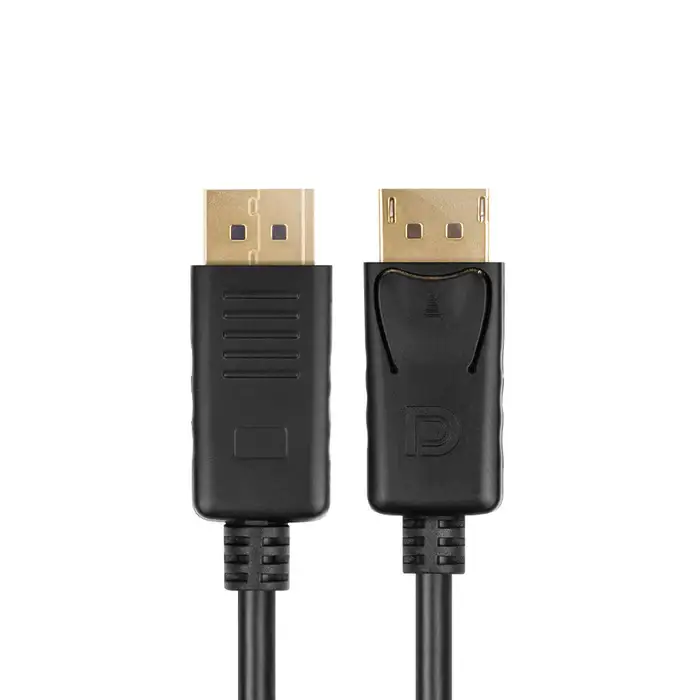
Unitek 4K 60Hz DisplayPort 1.2 Cable

| Quantity | Price |
|---|---|
| 10 | R295 |
| 15 | R285 |
| 20 | R280 |
- Section : Computers
- Category : Desktop PCs
- SKU : 123456654

Unitek 4K 60Hz DisplayPort 1.2 Cable
The Unitek 4K 60Hz DisplayPort 1.2 Cable is perfect for anyone who wants to enjoy amazing video and audio quality. This cable connects your DisplayPort devices to your display, providing clear and vibrant images. Whether you are gaming, editing videos, or watching movies, this cable makes everything look great!
Specifications
| Attribute | Details |
|---|---|
| Resolution Support | Up to 4K (3840 x 2160) |
| Refresh Rate | 60Hz |
| Connector Type | Gold-Plated DisplayPort |
| Cable Length | Available in various lengths |
| Shielding | EMI and RFI Protection |
| Material | Premium Copper Wire |
Key Features
- Supports stunning 4K video at 60Hz.
- Delivers high-definition audio and video.
- Gold-plated connectors for better conductivity.
- Protects against electromagnetic and radio frequency interference.
- Durable design for long-lasting use.
Applications
- Home theater setups for watching movies.
- Professional workstations for video editing.
- Gaming setups for an immersive experience.
- High-resolution media consumption on large displays.
- Connecting laptops to monitors for presentations.
The Unitek 4K 60Hz DisplayPort 1.2 Cable is your go-to choice for high-quality audio and video connections. Enjoy a stable and clear connection for all your devices!
Product Info Gallery
- Shipping Timeframes: All orders are processed within 2-5 business days (excluding weekends and holidays). After your order has been processed, the estimated delivery time is before 04 Feb, 2026, depending on customs, Please note that due to high demand, some items may experience longer shipping times, which will be communicated at order confirmation email.
- Order Processing Time: Please allow 2-5 business days for us to process your order before it is shipped . Orders placed after 16:00 on Fridays, or during weekends and public holidays, will begin processing on the next business day. Processing times may be extended during peak seasons or sales events.
- Manufacturing Time: Some products needs manufacturing time, the manufacturing process will take approximately 10-30 business days depending on the product. This timeframe may vary depending on the complexity of the product and current demand. but this will be communicated with you during order confirmation.
- Returns and Exchanges: We offer a 30-day return policy for most items. If you are not completely satisfied with your purchase, you may return it within 30 days of receipt for a refund or exchange. Items must be unused, in their original packaging, and accompanied by proof of purchase. Return shipping costs are the responsibility of the customer, unless the item was damaged or defective upon arrival.
1. What resolution and refresh rate does the Unitek DisplayPort 1.2 cable support?
This cable supports up to 4K (3840 x 2160) at 60Hz when used with DisplayPort 1.2–capable devices and displays.
2. Is this cable compatible with DisplayPort 1.4 or older DisplayPort versions?
Yes — the cable is backward compatible with older DisplayPort versions. When used with DisplayPort 1.4 ports it will work but operate at DisplayPort 1.2 performance (e.g., 4K60).
3. Does the cable carry audio as well as video?
Yes. The DisplayPort interface transmits both high-definition video and multi-channel audio over the same cable.
4. Can I use this cable for gaming at high refresh rates?
Yes for 4K gaming at 60Hz. For higher refresh rates or resolutions (for example 4K120 or 8K) you will need a cable and devices that support newer standards (DisplayPort 1.4/2.0 or HDMI 2.1).
5. Does the cable support MST (daisy-chaining multiple monitors)?
DisplayPort 1.2 supports MST (multi-stream transport). The cable will pass MST traffic, but daisy-chaining requires that your source GPU and monitors also support MST.
6. What lengths is the cable available in?
The Unitek cable is offered in various lengths. Choose the length that fits your setup; note that very long passive cables can reduce signal quality and may require an active cable for optimum performance.
7. What are the benefits of the gold-plated connectors?
Gold-plated connectors improve conductivity and resist corrosion, which helps maintain a reliable signal and long-term connection quality.
8. What type of shielding does the cable have?
The cable includes EMI and RFI shielding to protect against electromagnetic and radio frequency interference, helping ensure stable video and audio transmission.
9. Is the cable plug-and-play or does it require drivers?
The cable is plug-and-play. No additional drivers are required — just connect your DisplayPort source to your display and select the correct input.
10. Can I use this cable with adapters (DisplayPort to HDMI/DVI)?
Yes, you can use adapters. Passive adapters work if your source supports DP++ (dual-mode). For full 4K60 over HDMI you may need an active adapter that converts the signal.
11. Is this cable suitable for professional video editing and color work?
Yes. Its support for 4K60 and solid shielding make it suitable for professional workstations, though final color accuracy also depends on your monitor, GPU, and color pipeline.
12. Will this cable support HDR content?
HDR support depends on the source, display, and DisplayPort version. While basic HDR signaling may work, advanced HDR features are more fully supported in later DisplayPort revisions (such as 1.4).
13. How do I care for and maintain the cable to ensure longevity?
Avoid tight bends and kinks, unplug by the connector (not the cable), keep connectors clean and free of dust, and store the cable loosely coiled. These practices extend cable life and performance.
14. What should I do if I get no signal when using the cable?
Check that both devices are powered on and set to the correct DisplayPort input, ensure connectors are fully seated, try a different port or device to isolate the issue, and update GPU/display drivers or firmware as needed.
15. Does Unitek offer support or warranty for this cable?
Warranty and support details are not listed on the product description. For specific warranty or support information, contact Unitek customer support or consult the retailer where you purchased the cable.
Latest Order Arrivals
Discover our latest orders

12 Heads Embroidery Machine

Dewatering Pump Machine

Order Collection

Portable Water Drilling Rig

Order Usefully Collected

Batch of Orders

Agriculture Processing Machines

Meat Grinder Machine

Water Pump Equipment

Packaging Machine and accessories

Fabrics Manufacturing Equipment

Mining Equipments

Food Processing Machine

Batch of Orders

Batch of Orders

Latest Orders Labelled

wheel alignment machines

new arrivals

Pre Orders Offloading

Latest Arrivals

Latest Arrivals