B21, China Town Mall, Midrand


Particle Counter for Indoor Air Quality and Dust Testing

- Section : Medical Supplies
- Category : Testing Instrument
- SKU : 1600476084842

Particle Counter for Indoor Air Quality and Dust Testing:
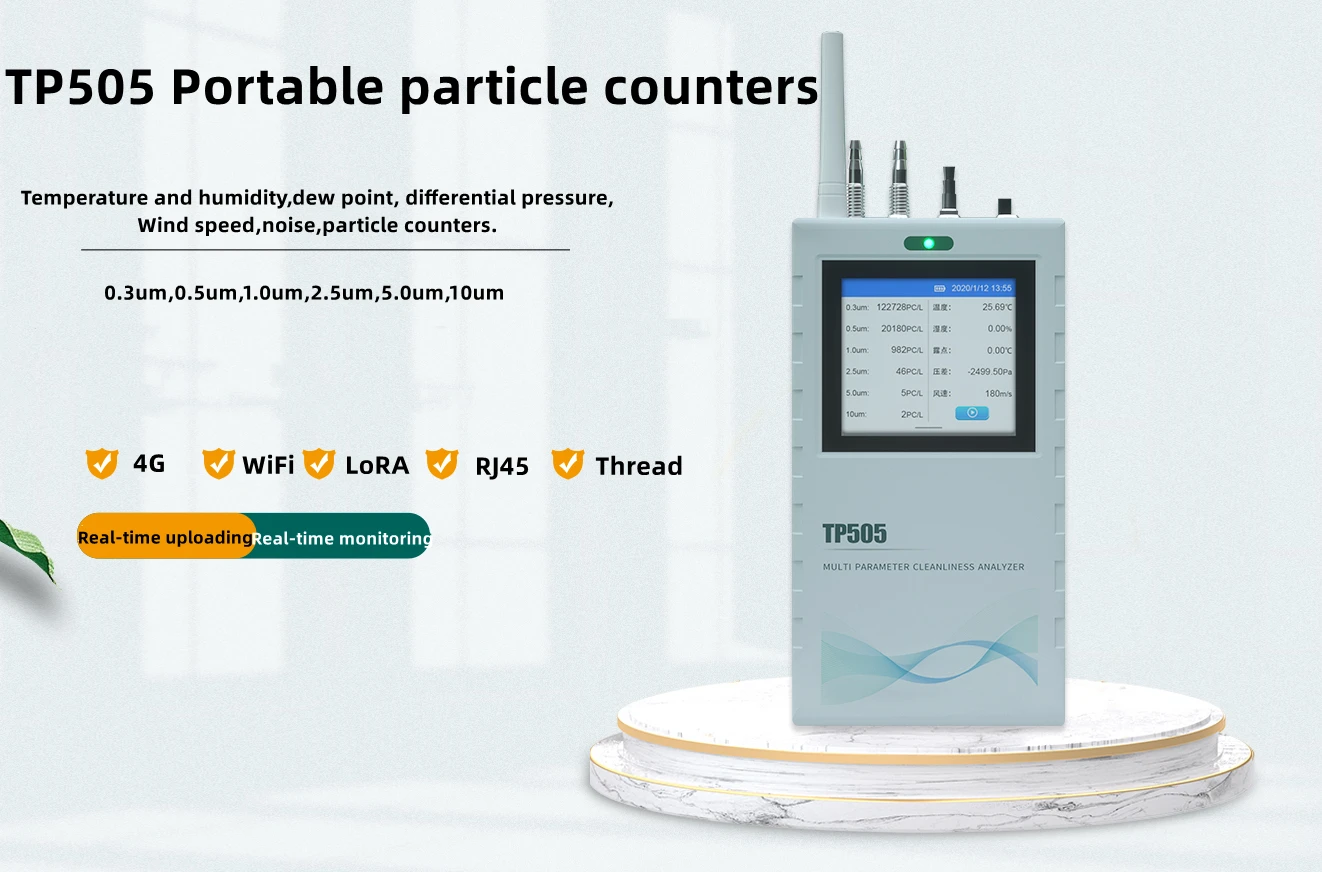
The Toprie TP505 Particle Counter is an essential tool for accurate particle detection, offering precise monitoring of indoor air quality and dust testing. This portable and efficient device helps ensure the cleanliness and safety of environments by measuring particle sizes from 0.3µm to 10µm.
Key Features:
- Accurate Particle Detection: Measures particle sizes of 0.3µm, 0.5µm, 1µm, 2.5µm, 5µm, and 10µm for detailed air quality analysis.
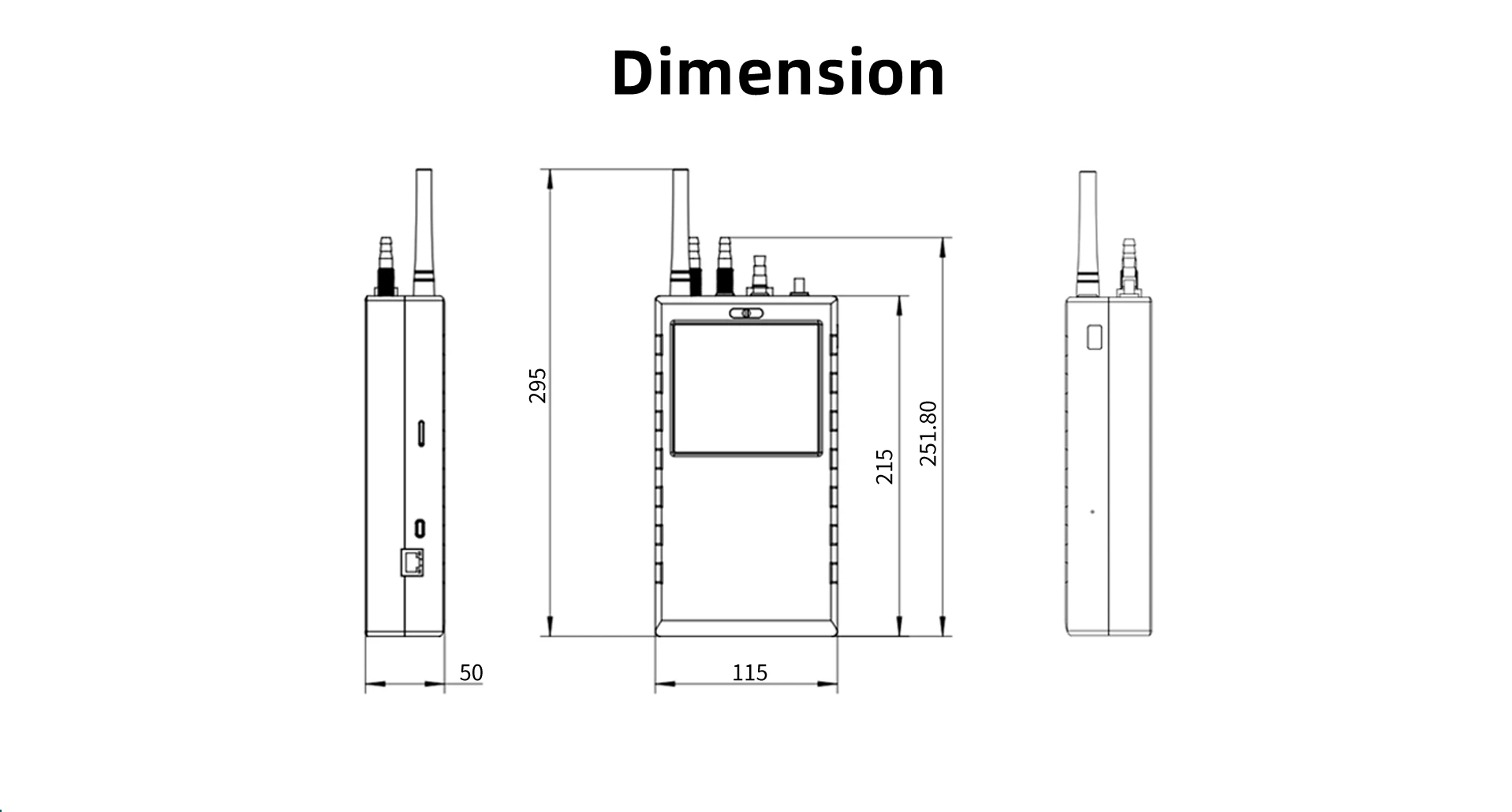
- Portable Design: Weighing only 800g and compact in size (21511458mm), it is easy to carry and use in various environments.
- High Battery Capacity: Equipped with a 5200mAh battery for extended use, ensuring reliable operation during long testing sessions.
- Sampling Flow: Offers a sampling flow rate of 2.83L/min, providing efficient air sampling for accurate results.
- Large Memory: Features 8GB of memory for storing test data, allowing for easy record keeping and analysis.
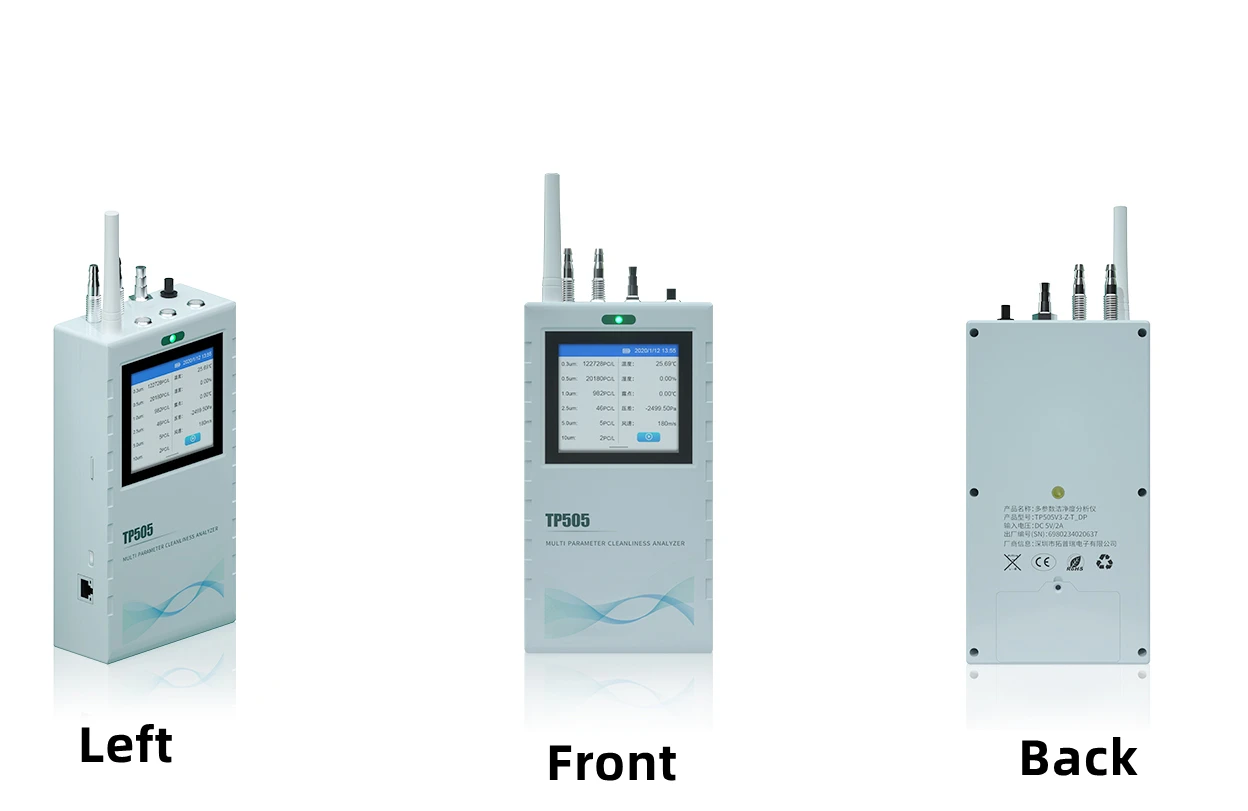
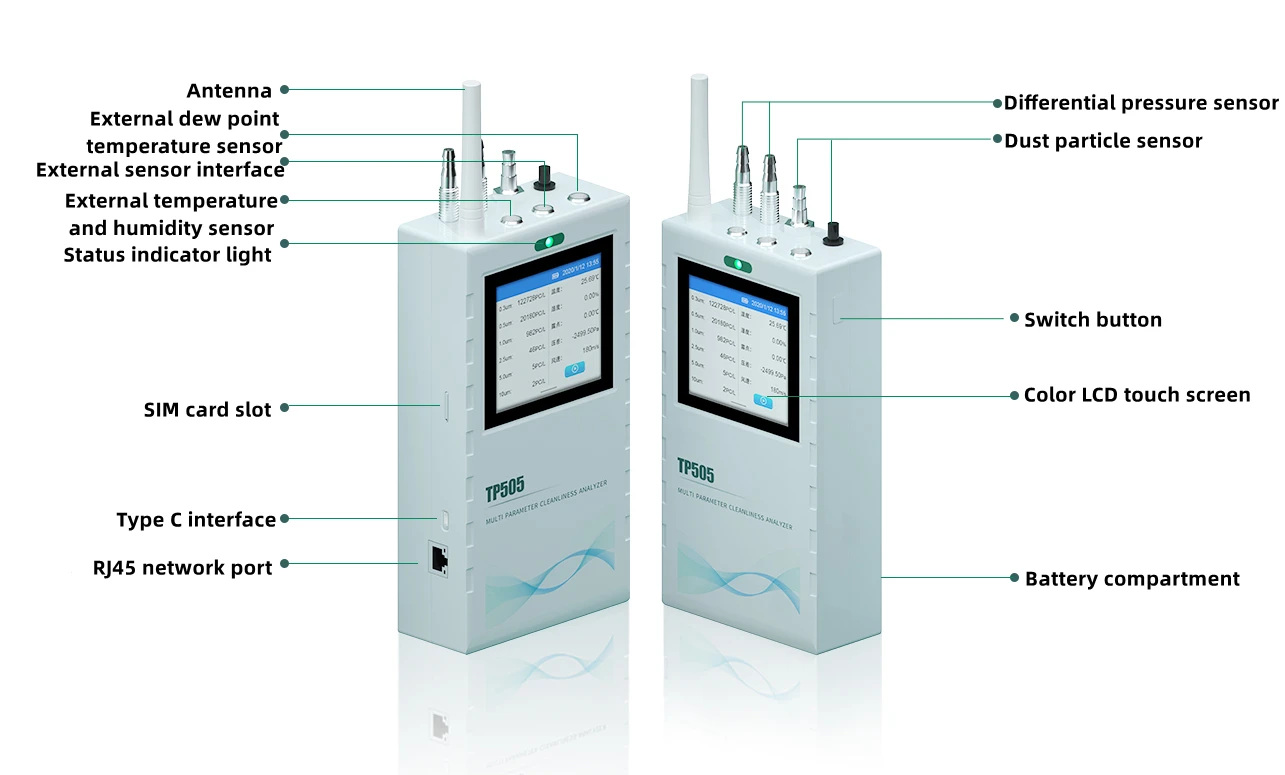
- User-Friendly Display: The color LCD touch screen provides a clear, intuitive interface for easy monitoring and operation.
- Certified Quality: CE and RoHS certified, ensuring the device meets international safety and quality standards.
- Customization Options: Offers OEM, ODM, and software reengineering services to meet specific needs.
| Input | DC5V/1.5A |
External sensor interface | Temperature and humidity: 4 pin aviation connector,interface type: I2C ( Temperature range:-20℃~60℃, accuracy:±0.5℃(0~50℃) other ±0.5℃ Humidity range:0~100%RH,accuracy±2%RH(20%~80%)other ±3%RH |
| Power supply:DC 3.3V | |
| Dew point:(optional), 5 pin aviation connector,interface type: TTL (1.VAISALA DMT143 range:-70℃~60℃ accuracy:±2℃ 2.ROTRONIC HC2A-SDP range:-40℃~20℃ accuracy:±2℃) | |
| Power supply:DC 3.3V (12V optional) | |
| Wind speed,noise & other gas sensor (optional) 5 pin aviation connector Interface type: RS485 | |
| Power supply:DC 3.3V (12V optional) | |
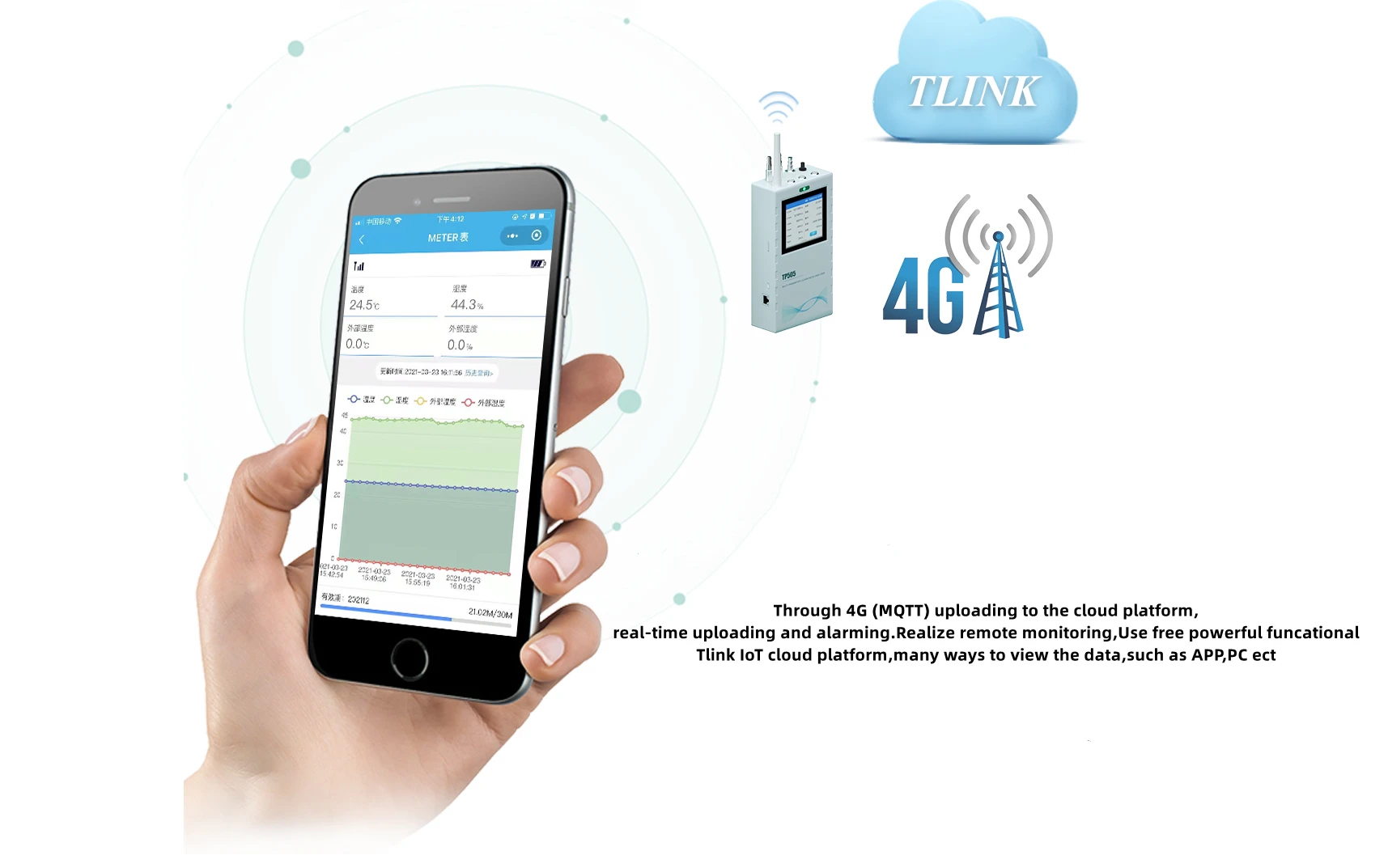
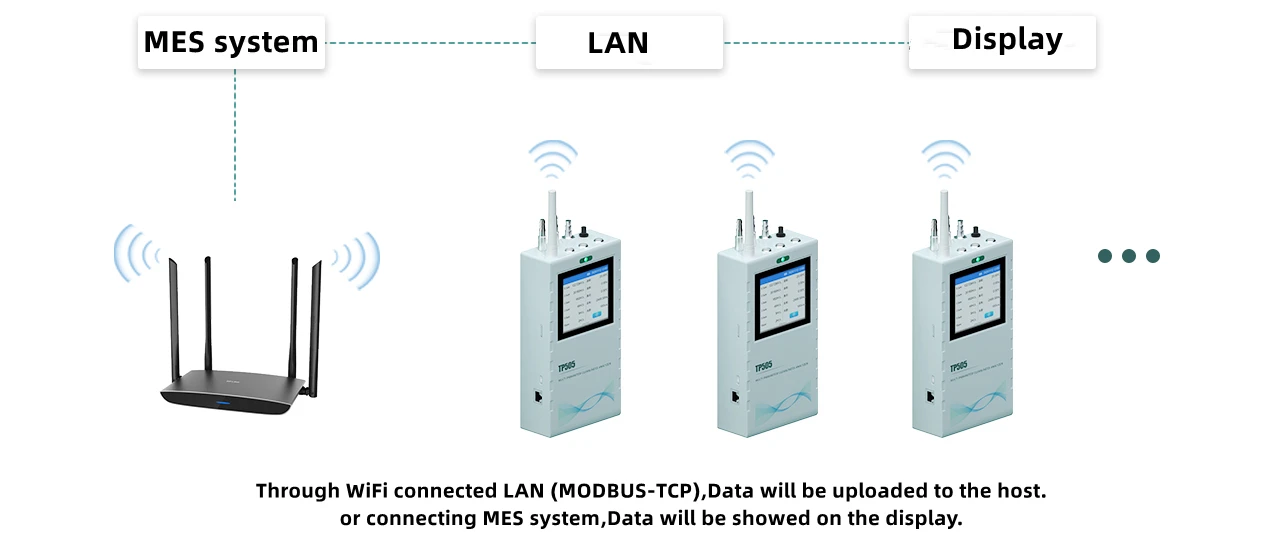
Data transmission mode | Wireless communication:4G/WiFi/2G (Selection)+ZIGBEE/THREAD |
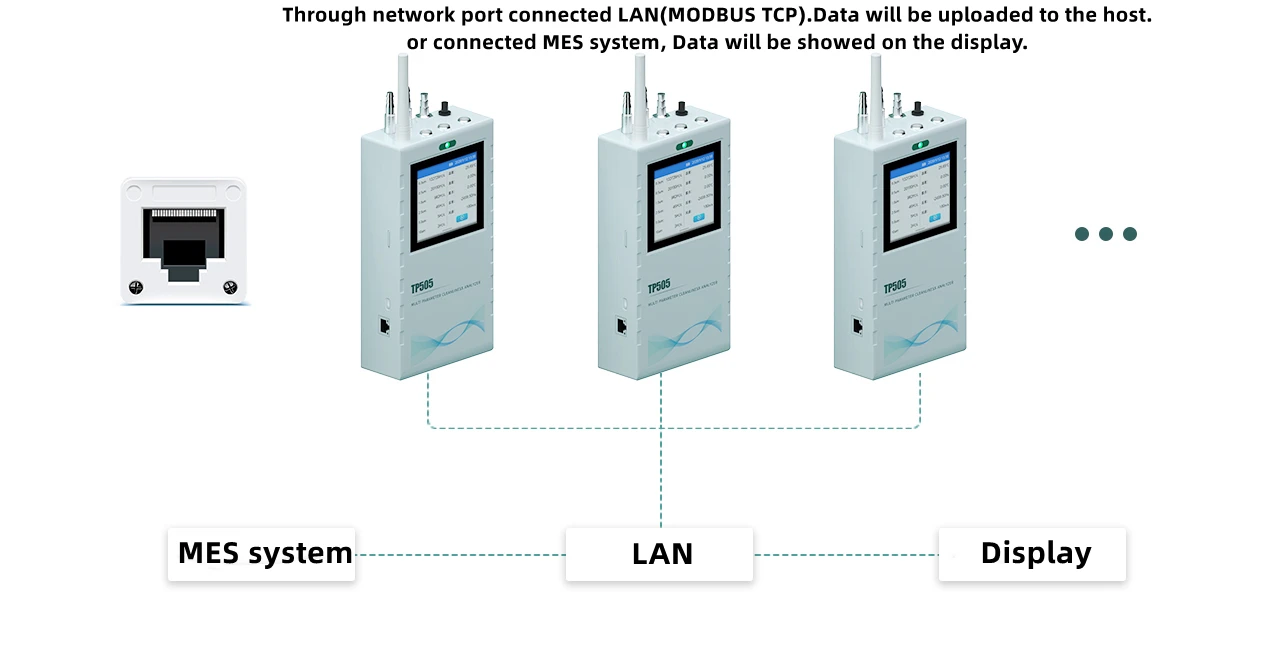
| Wired communication:RJ45 | |
Particle testing parameter | Particle size:0.3um,0.5um,1um,2.5um,5um,10um accuracy:5% resolution:1mg/m³ Range:200000 particles/L |
| Atmospheric sensor parameter | Range:-500MPa-500MPa 1/4 inch international Pagoda-Shape Connectors Error range:1% accuracy:±5Pa |
| Testing range | 0-60min (adjustable) |
| Material | Fireproof plastic shell, color could be customized, default color is gray |
Hardware feature
| USB Type C interface charging,debugging & upgrading |
| Power switch indicator light | |
| Capacity touch screen | |
| 480*480 color LCD touch display screen | |
| 8G memory | |
| SIM card slot | |
| SMA antenna | |
| Standby 200mA operation 550mA | |
| Weight:800g | |
| Dimension:215*114*48mm | |
| Operation environment:-10℃~60℃ 0~99%RH | |
| Storage environment: -20℃~65℃ 30%~80%RH | |
Software feature | 4G,LAN connect local platform,WIFI LAN connect server |
| Support ZIGBEE,THREAD,LORA WLAN uploading data | |
| Built in 8G memory | |
| Support USB query data (TP assistant) | |
| Support query historical data | |
| 4G & Network interface support MODBUS RTU protocol connect cloud platform | |
| Support network MODBUS RTU server and connection server function | |
| WLAN active report protocol function MODBUS RTU active report function |
The Toprie TP505 Particle Counter is ideal for use in laboratories, offices, industrial environments, and any location where air quality needs to be monitored. Its portable and efficient design makes it a reliable choice for dust testing and air quality assessment.
Product Info Gallery

- Shipping Timeframes: All orders are processed within 2-5 business days (excluding weekends and holidays). After your order has been processed, the estimated delivery time is before 03 Aug, 2026, depending on customs, Please note that due to high demand, some items may experience longer shipping times, which will be communicated at order confirmation email.
- Order Processing Time: Please allow 2-5 business days for us to process your order before it is shipped . Orders placed after 16:00 on Fridays, or during weekends and public holidays, will begin processing on the next business day. Processing times may be extended during peak seasons or sales events.
- Manufacturing Time: Some products needs manufacturing time, the manufacturing process will take approximately 10-30 business days depending on the product. This timeframe may vary depending on the complexity of the product and current demand. but this will be communicated with you during order confirmation.
- Returns and Exchanges: We offer a 30-day return policy for most items. If you are not completely satisfied with your purchase, you may return it within 30 days of receipt for a refund or exchange. Items must be unused, in their original packaging, and accompanied by proof of purchase. Return shipping costs are the responsibility of the customer, unless the item was damaged or defective upon arrival.
1. What particle sizes does the Toprie TP505 measure?
The TP505 measures particles at 0.3µm, 0.5µm, 1µm, 2.5µm, 5µm and 10µm for detailed air quality analysis.
2. What is the device's accuracy, resolution and measurement range?
Particle counting accuracy is ±5% with a resolution down to 1 mg/m³ and a concentration range up to 200,000 particles/L.
3. How portable is the TP505?
The unit weighs 800 g and measures 215 × 114 × 48 mm, making it compact and easy to carry for field and indoor use.
4. What is the sampling flow rate and how long can a test run?
Sampling flow rate is 2.83 L/min and the test duration is adjustable from 0 to 60 minutes.
5. What power and battery specifications does it have?
The TP505 includes a 5200 mAh battery, charges via USB Type-C, and accepts DC 5V/1.5A input; standby current ≈200 mA and operating ≈550 mA.
6. How is data stored and exported?
The device has 8 GB onboard memory, a SIM card slot and SMA antenna for wireless comms, and supports USB query via the TP Assistant, LAN/4G/WiFi uploads, and MODBUS RTU connectivity to cloud platforms.
7. What display and user interface does the TP505 use?
It features a 480 × 480 color LCD capacitive touch screen with an intuitive menu for monitoring, configuration and historical data queries.
8. Which certifications does the TP505 have?
The product is CE and RoHS certified, meeting international safety and environmental standards.
9. What external sensors and optional modules are supported?
External sensor interfaces include: temperature & humidity (4-pin aviation, I2C; temp -20–60°C, ±0.5°C within 0–50°C; humidity 0–100%RH, ±2%RH 20–80%), optional dew point modules (TTL interface with VAISALA or ROTRONIC options), and optional wind speed, noise and gas sensors (5-pin RS485).
10. Which communication methods are available?
Wireless: selectable 4G/WiFi/2G plus ZIGBEE or THREAD; Wired: RJ45 LAN. It also supports WLAN active report protocols and MODBUS RTU (client/server) for integration.
11. What environments is the TP505 suitable for?
It is suitable for laboratories, offices, industrial sites, HVAC inspections, clean areas and general indoor air quality monitoring where dust and particle testing are required.
12. What are the operating and storage conditions?
Operating: -10°C to 60°C, 0–99% RH. Storage: -20°C to 65°C, 30–80% RH.
13. Can the TP505 be customized for specific needs?
Yes. OEM, ODM and software reengineering services are offered to tailor hardware, enclosure color, software functions and communications to customer requirements.
14. How do I perform a basic particle measurement with the TP505?
Power on the unit, select measurement parameters (sampling time and mode) from the touchscreen, start the test, view results on the display, and save/export data via USB, LAN or wireless upload.
15. What maintenance, calibration and troubleshooting should I expect?
Keep the inlet clean, protect the optical path, update firmware via USB Type-C when available, and perform periodic calibration per your QA schedule (typically annual or per regulation). If the device won't power, check the USB-C power source and battery; for connectivity issues verify SIM/antenna and network settings or contact support for service.
Latest Order Arrivals
Discover our latest orders

12 Heads Embroidery Machine

Toilet Paper Machine Machine

Order Collection

Cross Border Clients

Order cros border countries Collected

Industrial Machine Cllection

Agriculture Processing Machines

Ready for collection

Water Pump Equipment

Packaging Machine and accessories

Fabrics Manufacturing Equipment

Mining Equipments

Food Processing Machine

Batch of Orders

Batch of Orders

Latest Orders Labelled

wheel alignment machines

new arrivals

Pre Orders Offloading

Latest Arrivals

Latest Arrivals

Latest Arrivals

Loading

Toilet paper making machine

Toilet paper making machine

Toilet paper Rewinding Machine

latest arrivals

offloading

order success

order collection

order offloading