B21, China Town Mall, Midrand

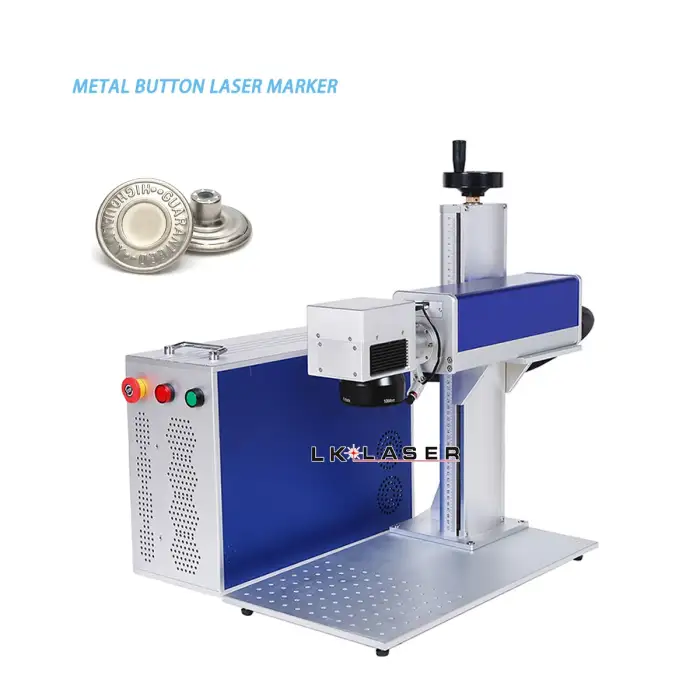
60w Desktop JPT Fiber Laser Engraver: Metal and Plastic Button Laser Marking Machine
Asset finance available
Do you want funding for this equipment?
Afrimart can connect you with trusted funding partners who specialise in asset finance for businesses like yours. Compare options and apply in minutes — final approval is subject to provider review.
Check funding options
Secure & no obligation

- Section : Machinery
- Category : Industry Laser Equipment
- SKU : 1601230278414

Product Description

How to Choose The Different Laser Watt?
Here is difference between 20w, 30w and 50w 100w
① 30w is more durable than 20w , and 100w is more durable than 50w
② if marking same content on same materials, 100w marking speed is faster than 20w/ 30w /50w
③ if marking same depth on same material, 100w marking time is shorter than 20w/ 30w /50w
Detailed Application
①The 20W machine is mainly used for surface marking of plastic, stainless steel, aluminum and so on.
②If the customer wants to engrave deeply, then a 30W machine will be a better choice. For all materials, aluminum is the easiest to achieve deep engraving, 30w machine will be a better choice.
③If you want to do deep marking on brass,silver, or gold or cut it, you need to choose the 50watt/100w. As you know, these materials are high-reflective materials.
Details Images

Available for rotation axis, but it doesn't include the rotation axis. You can purchase a rotation axis

Product Application
Application Materials:
All metal and some plastic, stainless steel, brass, hard alloy, electroplating products, ABS, epoxy resin, painted coated products, ceramics, etc.
Such as: logo printing ,QR code ,series number,production date,bar code

- Shipping Timeframes: All orders are processed within 2-5 business days (excluding weekends and holidays). After your order has been processed, the estimated delivery time is before 03 Aug, 2026, depending on customs, Please note that due to high demand, some items may experience longer shipping times, which will be communicated at order confirmation email.
- Order Processing Time: Please allow 2-5 business days for us to process your order before it is shipped . Orders placed after 16:00 on Fridays, or during weekends and public holidays, will begin processing on the next business day. Processing times may be extended during peak seasons or sales events.
- Manufacturing Time: Some products needs manufacturing time, the manufacturing process will take approximately 10-30 business days depending on the product. This timeframe may vary depending on the complexity of the product and current demand. but this will be communicated with you during order confirmation.
- Returns and Exchanges: We offer a 30-day return policy for most items. If you are not completely satisfied with your purchase, you may return it within 30 days of receipt for a refund or exchange. Items must be unused, in their original packaging, and accompanied by proof of purchase. Return shipping costs are the responsibility of the customer, unless the item was damaged or defective upon arrival.
1. What materials can the 60W Desktop JPT Fiber Laser Engraver mark?
The 60W Desktop JPT Fiber Laser Engraver can mark all metals and some plastics, including stainless steel, brass, hard alloys, electroplating products, ABS, epoxy resin, painted coated products, and ceramics.
2. How does the wattage affect the engraving speed?
Higher wattage machines, like the 100W, can mark content faster than lower wattage machines such as 20W or 30W when marking the same material.
3. What is the recommended wattage for deep engraving?
For deep engraving, a 30W machine is suitable for most materials, while for high-reflective materials like brass, silver, or gold, a 50W or 100W machine is recommended.
4. Can I engrave on plastic with this machine?
Yes, the 60W Desktop JPT Fiber Laser Engraver can engrave on certain types of plastics, as well as various metal surfaces.
5. Is the rotation axis included with the machine?
No, the rotation axis is not included with the machine, but it can be purchased separately.
6. What types of markings can I create with this engraver?
You can create various markings such as logos, QR codes, serial numbers, production dates, and barcodes.
7. How do I choose the right wattage for my needs?
If durability is a priority, consider higher wattage. For faster marking speeds and shorter marking times on the same depth, opt for a 100W machine.
8. What applications is this machine suitable for?
This machine is suitable for a wide range of applications including industrial marking, product customization, and signage.
9. Can I use this machine for cutting materials?
The 60W Desktop JPT Fiber Laser Engraver is primarily for engraving. For cutting, especially on thicker materials, a higher wattage like 50W or 100W is recommended.
10. What is the difference between 20W and 30W machines?
The 30W machine is more durable than the 20W and is better for achieving deeper engravings.
11. Does this engraver come with a warranty?
Warranty details may vary by seller; please check the specific seller's terms for warranty information.
12. How do I maintain the laser engraver?
Regular maintenance includes cleaning the lens, checking for software updates, and ensuring the machine is free from dust and debris.
13. What power supply is required for this machine?
The machine typically operates on a standard electrical outlet; please refer to the specific power requirements in the user manual.
14. Is training provided for using the laser engraver?
Training availability may depend on the seller; check if they offer tutorials or customer support for setup and operation.
15. How portable is the 60W Desktop JPT Fiber Laser Engraver?
The engraver is designed for desktop use, making it relatively portable, but ensure you have a suitable workspace and power supply.
Latest Order Arrivals
Discover our latest orders

12 Heads Embroidery Machine

Toilet Paper Machine Machine

Order Collection

Cross Border Clients

Order cros border countries Collected

Industrial Machine Cllection

Agriculture Processing Machines

Ready for collection

Water Pump Equipment

Packaging Machine and accessories

Fabrics Manufacturing Equipment

Mining Equipments

Food Processing Machine

Batch of Orders

Batch of Orders

Latest Orders Labelled

wheel alignment machines

new arrivals

Pre Orders Offloading

Latest Arrivals

Latest Arrivals

Latest Arrivals

Loading

Toilet paper making machine

Toilet paper making machine

Toilet paper Rewinding Machine

latest arrivals

offloading

order success

order collection

order offloading